Pikimov 5: A Powerful Free Web-Based Video Editor Gets New Features
With the release of Pikimov 5, the platform introduces a range of powerful capabilities that expand its use beyond simple editing. The new version now supports traditional video editing, 2D motion design, and 3D compositing, all directly in the browser.
One of the interesting things about Pikimov is its inspiration. The project draws from Photopea, a popular free browser-based alternative to Photoshop. Photopea demonstrated that professional creative tools could run directly in the browser without installation, and Pikimov applies a similar philosophy to video and motion design.
With version 5, Pikimov takes a significant step forward by expanding its editing environment and adding new creative tools that bring motion graphics and 3D workflows to a browser-based platform.
A Browser-Based Editing Platform
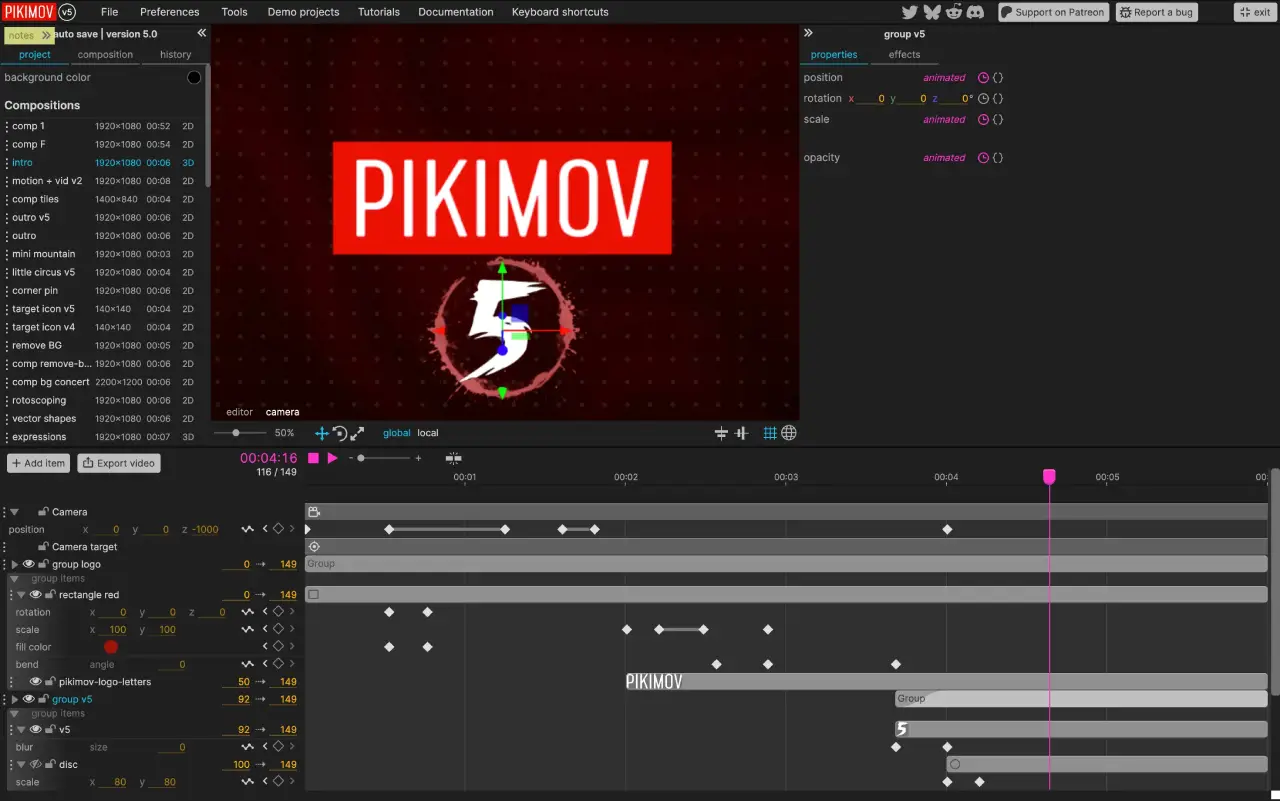
Pikimov runs entirely in the browser, meaning users can work from virtually any device without installing software or creating an account. The editor launches instantly and presents a familiar layout for anyone experienced with modern video editing tools.
The interface includes the essential components expected in a professional editing environment:
- A timeline for arranging clips
- A canvas for previewing content
- Media bins for managing assets
- A properties panel for adjustments
- An effects library for visual enhancements
The project is funded primarily through donations, allowing the developer to continue improving the platform while keeping it free for users.
Classic Video Editing Tools
At its core, Pikimov still functions as a capable video editor. Users can combine video, images, audio, and text elements within a multi-track timeline. The platform supports common editing workflows such as blending clips, adjusting properties, and creating transitions.
The editor also includes keyframing, which allows creators to animate properties like opacity, position, and scale over time. This feature enables basic motion graphics and animated transitions directly within the editing environment.
Canvas controls provide intuitive transformations, allowing elements to be moved, scaled, and rotated visually, similar to what users would expect from traditional desktop editors.
Built-In Effects and Visual Enhancements
Pikimov 5 introduces a growing collection of visual effects designed to enhance video projects. Effects such as glitch, wiggle, and motion blur allow creators to quickly add stylized animation and movement to clips.
These effects are adjustable and can be combined with keyframes to create dynamic motion or transitions. The platform also supports track-level controls including blending modes, as well as options to lock, hide, or mute tracks within the timeline.
3D Compositing Arrives in Pikimov 5
One of the biggest additions in Pikimov 5 is the introduction of 3D compositing. The editor now includes a dedicated environment for working with 3D scenes directly inside the browser.
The system supports GLB 3D models, allowing creators to import objects and combine them within a scene. Multiple objects can be arranged together to build simple 3D compositions that integrate seamlessly with the rest of the project.
Lighting tools are also available, enabling scenes to be illuminated using different light sources and intensities. Combined with camera animation and keyframing, this makes it possible to create animated 3D sequences without leaving the editor.
Motion Graphics and Animation
Animation plays a central role in Pikimov’s workflow. Text elements, objects, and even camera movement can be animated using keyframes. The interface displays animated attributes directly within the timeline, making it easier to visualize and adjust motion.
For creators interested in motion graphics, the editor also includes vector shapes that can be customized and animated. Individual points on shapes can be adjusted to create custom animations and transitions.
Keyframe interpolation controls are available as well, allowing motion to be refined with smoother or more stylized timing.
2D Compositing and Motion Tracking
In addition to 3D features, Pikimov 5 expands its 2D compositing capabilities. The platform includes motion tracking tools that can follow specific points within footage. This allows objects, graphics, or text to be attached to moving elements in a scene.
Color grading tools have also been introduced, including adjustments like curves, enabling creators to fine-tune the visual style of their footage.
Pre-Compositions and Workflow Flexibility
Another notable feature is support for pre-compositions, often called pre-comps. These allow complex scenes or animations to be grouped into a single element that can be reused or layered within other timelines.
This flexibility makes it easier to combine multiple elements such as:
- 2D animations
- 3D scenes
- video footage
- motion graphics
By nesting compositions together, users can create more sophisticated projects while keeping the main timeline organized.
A Promising Future for Browser-Based Editing
Pikimov 5 demonstrates how far browser-based creative tools have come. With support for video editing, motion graphics, 3D compositing, tracking, and visual effects, the platform is evolving into a surprisingly capable environment for creators who want powerful tools without expensive software.
As development continues, Pikimov has the potential to become an even stronger option for creators looking for a free, accessible, and browser-based motion design tool.
For those interested in exploring the editor, you can try Pikimov 5 directly at https://pikimov.com