Tamga: Free 3D Sculpting and Stylized Rendering for Every Platform
Its philosophy is simple: a capable, distraction-free creative environment that stays entirely on your device.
What Is Tamga?
Tamga sits at an interesting crossroads between a sculpting tool and a stylized rendering application. It is not intended to compete directly with industry heavyweights like ZBrush or Blender, but rather to offer a focused, lightweight alternative for concept artists, hobbyists, educators and anyone who wants to sketch ideas in 3D without the overhead of a complex pipeline.
The tool covers the full creative arc from initial form building to sculpting, painting, lighting and final stylized output, all within a single, unified interface.
Availability and Licensing
Platforms
Tamga runs on an unusually broad range of platforms. The web version can be launched directly from a browser without any installation. Native applications are available for iPad, macOS, Windows (including both 64-bit and ARM versions) and Linux. The desktop and web versions are functionally equivalent, offering the same feature set regardless of where you access it.
Free and Commercial Use
For personal use, educational purposes and nonprofit projects, Tamga is completely free. There is no account required, no subscription to manage and no advertisements. For those who wish to use the tool commercially, a commercial license is available for purchase.
Offline by Design: A Privacy-First Approach
One of the defining aspects of Tamga is its deliberate offline-first design. The creator has stated that in an era of industrial-scale art scraping, your work should remain entirely on your own device. Tamga operates almost entirely offline, with no cloud dependency. This positions it as a trustworthy environment for artists who are concerned about the ownership and security of their creative work.
A Tour of Tamga's Core Workspaces
Tamga organizes its tools into dedicated workspaces, each focused on a specific stage of the creative process.
The Form Workspace
The Form workspace is where the initial shape of a model is established. Tamga uses a Signed Distance Field approach, sometimes described as a blobs or metaballs method, to build geometry. Objects can be combined using boolean operations including union, subtraction and intersection. This approach makes it intuitive to assemble complex forms from simpler primitives before moving into finer detail work.
The Sculpting Workspace
The Sculpting workspace provides a set of core brushes including clay, smooth and other standard sculpting tools. Masking capabilities are also present, with options to invert, blur and sharpen masks, as well as extract masked regions, in a manner familiar to users of ZBrush. Tamga also supports dynamic topology, a system that automatically adjusts mesh density as you sculpt, similar to Dyntopo in Blender or Sculptris Pro in ZBrush. Remeshing and decimation tools are available to help manage the density and performance of your sculptures.
The Painting Workspace
Painting in Tamga is vertex-based, which means color and material information is stored directly on the mesh rather than through UV-mapped textures. Artists can paint across multiple channels including albedo (base color), roughness, metallic, scatter and glass. The glass channel functions similarly to a transparency or masking feature found in tools like Substance Painter, allowing certain parts of the model to be made invisible or translucent.
The Lighting Workspace
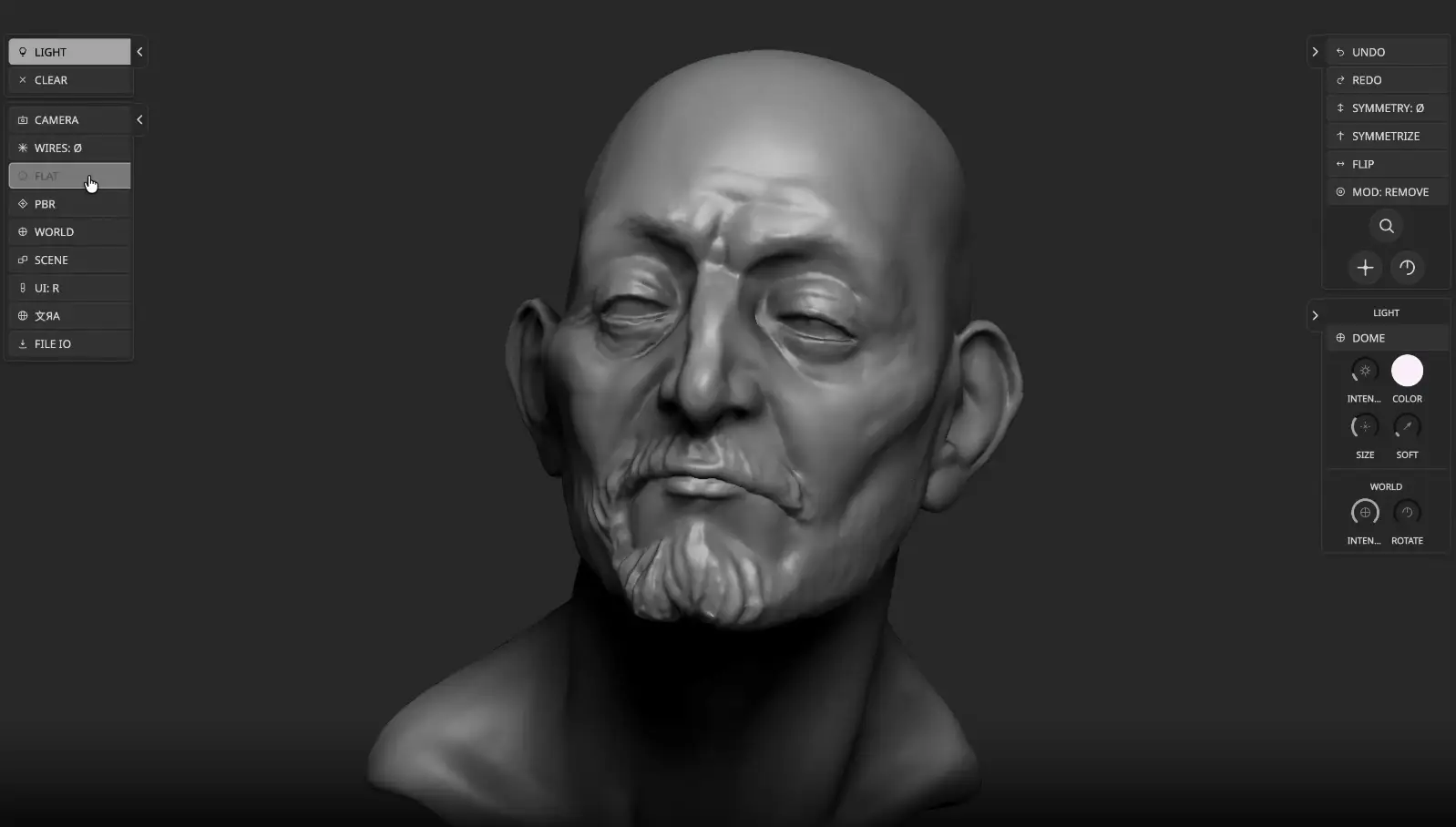
The Lighting workspace features a light dome system that allows artists to place individual light points directly onto a spherical canvas surrounding the scene. Each light can be repositioned, scaled and have its intensity and color adjusted independently. HDRI-based world lighting is also available, offering preset environments such as sunset or interior settings to quickly establish the mood of a scene.
The Inking Workspace
The Inking workspace is focused on stylized, compositing-style output. Artists can apply ink-like strokes directly onto the 3D surface and work with a paper mode that introduces traditional media aesthetics, with controls for valleys, peaks and chisel effects. Shadows, reflections and other compositing elements can be layered here, pushing the final output toward an illustrative rather than photorealistic look.
The Pose Workspace
The Pose workspace allows for basic model deformation through an anchor-based system. It is worth noting that this workspace is known to be unstable in its current state and may crash during use. For pose-related work, it is generally advisable to export the model and handle posing in an external application.
Rendering and Camera Capabilities
View Modes
Tamga supports several view modes for evaluating your work. These include a flat-shaded mode, a wireframe mode, a matcap mode and a physically based rendering (PBR) mode with full lighting support. The PBR environment can be configured via the world settings, where the HDRI rotation and visibility can be adjusted.
Camera Controls
The camera in Tamga includes a notable range of cinematic controls. These encompass chromatic aberration, exposure, contrast, saturation, depth of field, film grain, temperature, tint and a fade control. These settings allow artists to frame and stylize their renders directly within the application without relying on external compositing software.
Import and Export
Tamga supports import and export in the Wavefront OBJ format. This makes it straightforward to bring sculpted models into other applications such as Blender, ZBrush or Autodesk Maya when a more complex pipeline is required.
Known Limitations
Tamga is a focused tool and does not attempt to replicate every feature found in professional-grade sculpting software. Notably, it does not support alpha brushes, Vector Displacement Maps (VDMs) or an insert mesh system comparable to ZBrush's. For artists whose workflows depend on these specific capabilities, Tamga would serve best as a complementary sketching and ideation tool rather than a primary production application.
Who Is Tamga For?
Tamga is a compelling option for a broad range of users. Concept artists looking for a fast, low-friction way to sketch ideas in 3D will find it immediately accessible. Students and educators benefit from its completely free availability with no barriers to entry. Hobbyists who want to explore 3D sculpting without committing to a complex setup will appreciate its simplicity. Even experienced artists may find it useful as a quick offline sketchbook when a full workstation is not available.
Final Thoughts
Tamga occupies a distinct and useful niche in the 3D creative landscape. It is not trying to replace professional tools, but it offers something those tools often cannot: instant availability, total privacy, zero cost for non-commercial use and a clean workspace free of distractions. In a field where software is increasingly subscription-based and cloud-dependent, Tamga's offline-first, free-by-default approach feels genuinely refreshing.
For those curious to explore it, Tamga can be tried directly in the browser or downloaded for any of its supported platforms at tamga.galata.ink.