Charactool: The 3D Reference Tool for Digital Artists
What Is Charactool?
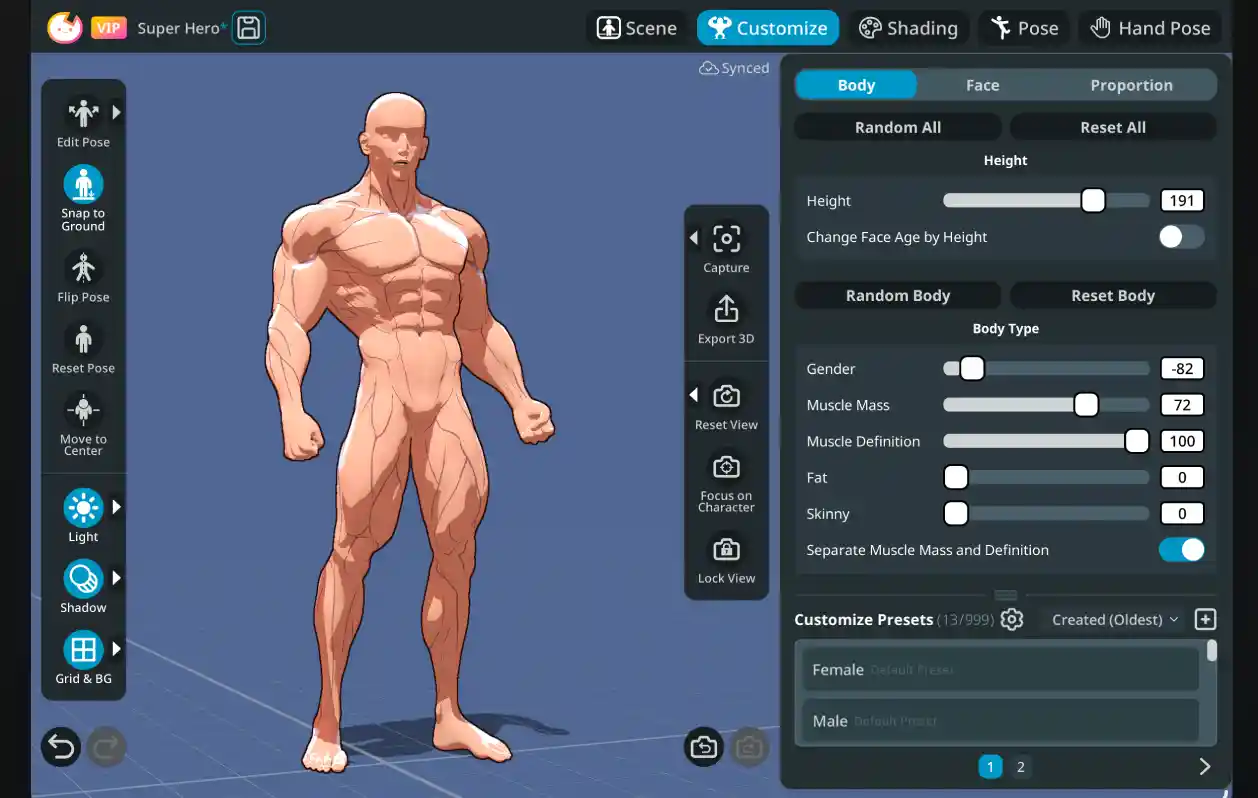
Charactool is a 3D body and pose reference application designed for digital artists. Created by the artist Yunyong, it provides a customizable 3D mannequin system that helps artists draw with confidence. Whether you are working on manga, webtoon, illustration, or concept art, Charactool gives you a flexible reference that adapts to your creative needs. The tool is available for free, which makes it an accessible option for artists at any level.
Where Can You Use Charactool?
Charactool is available across multiple platforms, making it a practical choice regardless of your setup.
Web Version
A free web editor is accessible directly through the Charactool website. It is focused primarily on body customization and preset selection, offering a solid starting point for artists who want to explore the tool without needing a mobile device.
iOS App
The most complete experience is found on the iOS app, available for both iPad and iPhone on the App Store. The mobile version unlocks the full posing system and all advanced features. Cross-device cloud sync means you can start a scene on your iPad and continue on your iPhone without losing any progress.
What Charactool Offers
Diverse Character Presets
Charactool ships with a wide range of pre-built character presets, from heroes and warriors to seniors, teenagers, and fantasy figures such as a dwarf or a blue alien. These presets provide instant starting points that artists can further customize to match their creative vision.
Deep Body Customization
Artists can fine-tune a large number of body parameters including height, build, shoulder width, pelvis width, muscle definition, belly fat, and more. Facial proportions and deformers are also available, allowing the creation of truly unique characters rather than generic mannequins.
Posing System
The posing system on iOS is built for intuitive use. Artists can rotate, reposition, and adjust limbs using simple touch gestures. The tool includes inverse kinematics controls such as pole vectors for precise placement of knees, feet, and other joints. A library of preset poses covers common positions including standing, sitting, running, boxing stances, and more.
Hand Posing
One of the standout features is the dedicated hand posing interface. Artists can adjust all five fingers simultaneously or control individual joints for precise hand shapes. Poses can be flipped between left and right hands, adding further flexibility.
Shading and Visual Styles
Charactool supports multiple shading modes including toon, semi, and realistic. Artists can toggle muscle outlines, activate colored muscle overlays, and adjust skin tone freely. Several visual presets are available such as studio, clay, anime, and soft styles, helping artists match the reference to the aesthetic of their project.
Export Options
For users on the Pro tier, Charactool supports export in FBX, OBJ, and USDZ formats. FBX exports retain the full character rig, making it possible to continue posing the character in external applications such as Blender or Clip Studio.
Pricing
Charactool operates on a three-tier pricing model designed to suit different levels of need.
Free Tier
The free tier gives access to the core features of the tool, including character customization, preset poses, and shading options. It is a fully functional starting point for artists who want to explore what Charactool has to offer at no cost.
Plus Tier
The Plus tier extends the free version by allowing artists to save up to 30 scenes, making it a practical option for those working on multiple projects at the same time.
Pro Tier
The Pro tier unlocks full export functionality, enabling 3D file exports in FBX, OBJ, and USDZ formats. This tier is aimed at artists who need to bring their Charactool references into broader creative pipelines.
Who Is Charactool For?
Charactool is built with digital artists in mind, particularly those working in webtoon, manga, illustration, and concept art. Its approachable interface and rich customization options make it a strong alternative to generic reference tools or expensive 3D software. The free tier lowers the barrier to entry significantly, and the iOS app brings a surprisingly capable posing toolkit to a mobile format. The tool supports 7 languages, reflecting its reach across a global creative community.
A Thoughtful Tool for the Modern Artist
Charactool addresses real needs of illustrators and comic artists with a combination of deep body customization, intuitive posing, and multiple visual styles. It gives artists a reliable reference companion without requiring expertise in 3D software. With a free tier available on both the web and iOS, it is worth exploring for anyone looking to strengthen the foundation of their artistic process.