AnimGen and the Final Game Animation Sample for Unreal Engine 5.8
Character animation in Unreal Engine is going through one of its most interesting moments in years. Epic Games has released a brand new AnimGen sample project built on an experimental machine learning plugin, and at the same time it has shipped what it says is the final update to its hugely popular Game Animation Sample. Together, these two releases sketch out where character motion in Unreal is heading, and they are especially significant for solo developers and programmers who do not have years of hands on animation experience.
What AnimGen Is
AnimGen is an experimental plugin that uses machine learning to build and train character animation controllers directly inside Unreal Engine. Instead of relying entirely on massive libraries of handmade animations, AnimGen can learn how a character should move and then generate that motion at runtime. The idea is a shift away from manually authoring or motion capturing every single variation, and toward feeding a system a data set of example animations and letting it fill in the gaps.
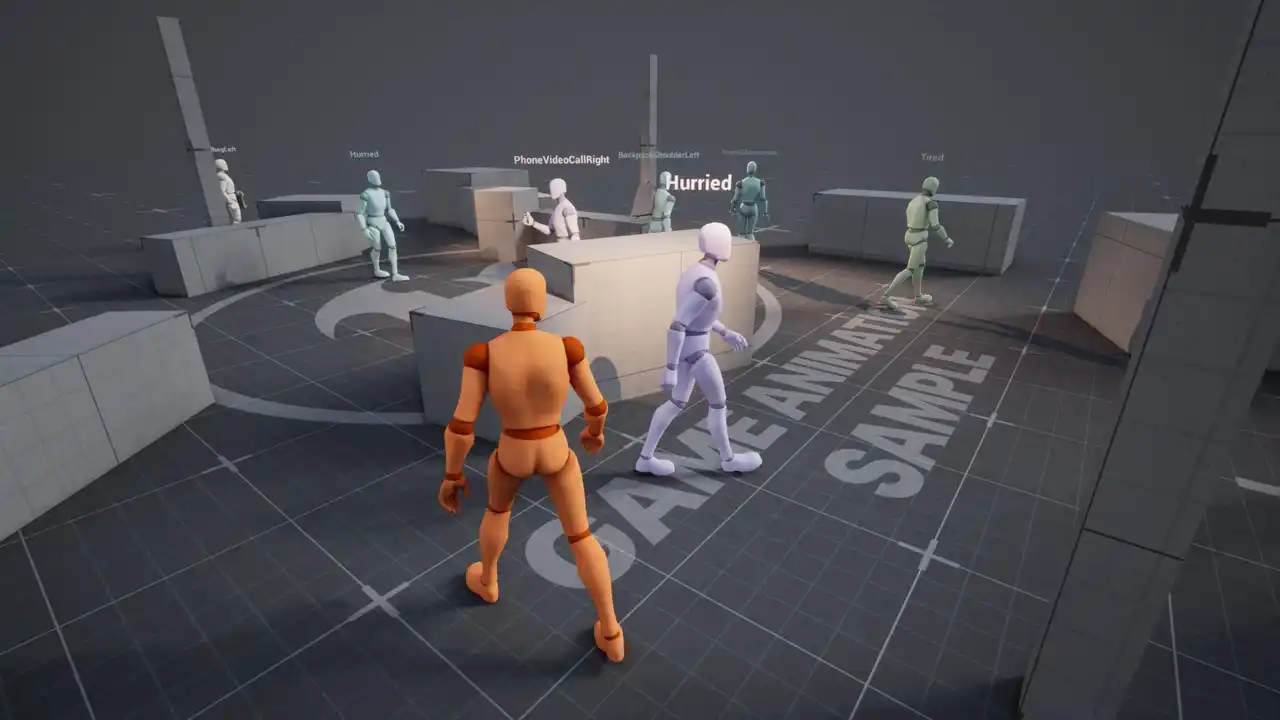
The accompanying AnimGen sample project shows the concept in action. It ranges from basic walking, aiming, and shooting all the way up to non player characters that can move with a huge number of completely different styles, even adapting their locomotion while carrying different props.
Generating Animation Variety at Runtime
The clearest way to understand AnimGen is to look at the crowd of characters in the sample level. Each one displays the style it is currently performing, and the range is remarkable. One character carries a backpack on a shoulder, another holds a grocery bag, another is on a phone video call, and others are drinking from a straw, eating a burger, carrying a handbag, or holding a briefcase. There are around forty distinct styles in total.
What makes this powerful is that the system is not simply swapping a prop into a fixed pose. It generates the full walk cycle to match. A slow style, a neutral female style, a walk in heels, an elderly limp, a tired walk, and even a headphones dance all change the way the character actually moves. The animations are produced procedurally rather than hand animated one by one, which means a developer could create a huge amount of NPC variety without recording motion capture for every situation.
How the Learning Works at a High Level
Under the hood, AnimGen is trained on data sets of existing animations. In the sample, the training data draws on recorded locomotion clips of characters walking, turning in place, strafing, and handling a pistol. The plugin processes that motion and can then generate new animations based on the input it is given.
The takeaway for creators is the workflow rather than the internals. You provide the system with a body of reference animation, whether that is content from Epic's own libraries or assets such as the Paragon characters, and the algorithm learns to produce the styles and actions you need. For anyone imagining custom motion like holding a rifle, wielding a sword, or performing a combat move, this points toward a future where much of that work is generated rather than built frame by frame.
The Game Animation Sample Reaches Unreal Engine 5.8
Alongside AnimGen, Epic updated its Game Animation Sample for full compatibility with Unreal Engine 5.8. This is a free download that has become one of the highest rated releases on the store since it first launched with Unreal Engine 5.4, holding a 4.8 star rating across hundreds of reviews. It bundles more than five hundred game ready animations, full motion matching locomotion, and a character setup that can be dropped straight into a project.
There is a bittersweet note to this release. According to the team, because Unreal Engine 5 is winding down and development is moving to Unreal Engine 6 and its new animation framework, this is the last planned update to the sample project. Nothing is being removed, and it remains free to download and fully functional. That finality arguably makes this the most important version the team has shipped, since it is the reference that developers will be learning from going forward.
The Physics Control Component
The headline addition is the Physics Control Component, and it is the feature that makes much of the rest possible. Traditionally, when a character ragdolls, the animation stops and the body goes completely limp. The new component instead places linear and angular motors on the joints, so the skeleton can be pushed and pulled while physics is still running. The result is a character that can actively brace and react rather than simply collapsing.
A companion Physics Control Asset stores profiles that can be applied to a physics asset, so a character can have a different physical response for taking a hit than it does for falling from a height. Paired with this is a new ragdoll capable pawn with proper animation states for fall protection, injury reactions, and rolling. Rather than snapping from a physics pile into a canned get up animation, the character braces, rolls out of the fall, and lets motion matching blend cleanly into a recovery, which is exactly the transition that usually looks awkward.
Multi Character Motion Matching
Motion matching in Unreal has historically worked on a single character at a time. This update extends it across two skeletal meshes at once, which opens the door to contextual interactions between characters. New examples include a shove, a takedown, and a two person takedown, with variations for standing, walking, and running.
The important detail is that these interactions cover all of the approach angles automatically. Instead of writing logic to check whether a character is in front of or behind an opponent, a developer can place the interactions into a pose search database, call the multi character motion match, and let the system work out which paired animation fits the real positions of both characters. It is the kind of contextual combat previously associated with big budget titles, now demonstrated inside a free sample.
The Ragdoll Obstacle Course
To show these systems off, Epic added an entirely new level built as a moving obstacle course, complete with spinning bars, rotating platforms, and swinging hammers. It is a playful environment, clearly inspired by physics party games, and it includes a section designed specifically to demonstrate automatic roll recovery as a character is launched and works out how to land. It is not presented as a serious feature, but it doubles as a ready made starting point for anyone experimenting with a physics driven party game.
The Look At Control Rig
One of the quieter additions may be among the most useful. A new look at solver is built entirely inside Control Rig, which means it is open and adjustable. It is additive and non destructive, so it layers on top of whatever animation is already playing rather than overriding it. Locomotion keeps running while the head and chest lean toward whatever the character is meant to be looking at, with per body part control over how much each part reacts.
Epic shipped several demonstrations of the effect, including look at behavior layered over running loops, used to extend acting gestures, and driving the scanning gaze of a patrolling NPC. That last case captures why it matters. A guard that actually looks around reads as alive, and the effect costs very little while noticeably changing how a scene feels.
Chooser and Pose Match Improvements
The sample also rebuilt the pawn's blending around a new Chooser with an improved Pose Match Column. In practical terms, the Chooser can now hold any number of pose search databases behind a single designer friendly layer, with each asset declaring which database it belongs to. This brings selection and motion matching together in one place instead of choosing a database first and matching within it. Blend spaces were shown working inside the Chooser as well, and new slope animations were added.
Smart Object Interactions
Finally, the smart object benches gained a new capability. Where earlier versions let NPCs sit on them, the player can now sit as well through a new state tree and accompanying tasks. Epic is upfront that this is a demonstration rather than a complete interaction system, but it stands as a solid example of how motion matching can be used to interact with objects in the world.
Why These Releases Matter
Taken together, AnimGen and the final Game Animation Sample represent two sides of the same shift. The sample project captures the current best practices for modern animation in Unreal Engine and preserves them as a free, high quality reference, while AnimGen hints at a future where much of that animation could be learned and generated rather than hand crafted. For independent developers in particular, the combination lowers the barrier to believable character movement, whether the goal is a crowd of varied NPCs, physically reactive characters, or contextual combat.
Both are free, both are worth taking apart, and both are strong signals of where Unreal Engine animation is going next.
Links and Resources
AnimGen Example
https://www.fab.com/listings/df37eb46-09bf-4604-9307-cdc39c769790
Game Animation Sample
https://www.fab.com/listings/880e319a-a59e-4ed2-b268-b32dac7fa016