AutoRemesher: A Free Open Source Auto Retopology Tool
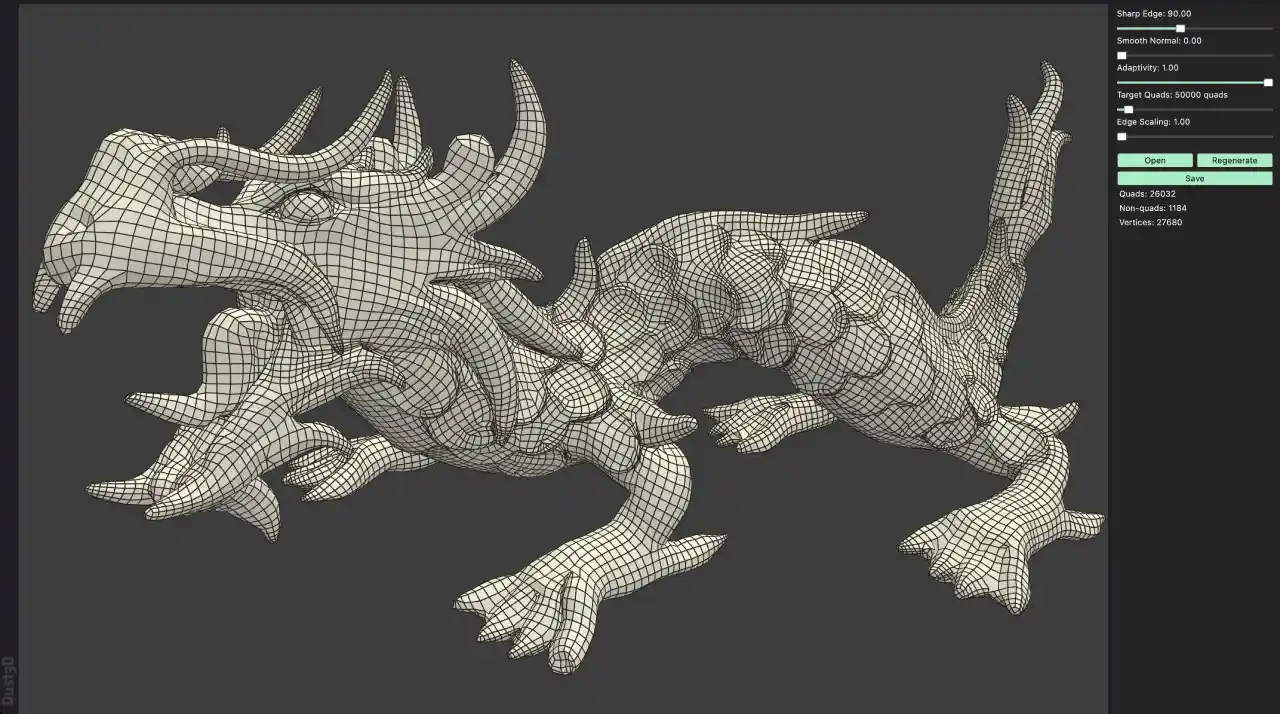
Retopology has always been one of the more tedious steps in 3D modeling. Turning a dense, messy sculpt into a clean, animation ready mesh usually means hours of manual work. AutoRemesher is a free tool that aims to take much of that pain away by automatically generating optimized quad meshes from your existing models.
What Is AutoRemesher?
AutoRemesher is a free, open source auto topology tool built for creating optimized quad meshes. With it you can produce high, medium, and low poly versions of a model, each with clean, usable topology. It is developed by Huxingyi, the creator behind the Dust3D project, and is built on top of several well known computational geometry libraries including Geogram, libigl, OpenVDB, and CGAL.
One important point worth highlighting is that AutoRemesher does not rely on any kind of online AI algorithm. It is a fully offline desktop application. Everything is processed locally on your machine, which means no cloud uploads, no subscriptions, and no dependency on an internet connection.
Why Clean Topology Matters
When you sculpt or generate a model, the resulting topology is often chaotic, with uneven polygons and no logical edge flow. This kind of mesh is difficult to animate, texture, or edit further. Clean quad topology, on the other hand, deforms predictably, subdivides smoothly, and is far easier to work with down the pipeline. AutoRemesher takes a messy input mesh and reworks it into an even, quad based surface that is much more production friendly.
How It Works at a High Level
The workflow is refreshingly simple. You import a model, and as soon as it loads the app begins processing. A thin progress bar appears at the top of the interface while the calculation runs. Processing time varies with the complexity of the model and can take anywhere from a few seconds to well over half a minute.
Once finished, the tool presents a regenerated version of your model with clean quad topology in place of the original mess. From there you can adjust settings and export the result, ready to bring into a program like Blender for comparison or further refinement.
Adjustable Settings
AutoRemesher gives you meaningful control over the output. A settings panel lets you influence the sharp angle handling, the target number of quads, and other parameters that shape the final result. By moving a slider and regenerating, you can quickly dial in the polygon density and topology that suits your needs, whether you want a detailed high poly mesh or a lightweight low poly version.
Where It Works Well and Where It Struggles
It is important to set realistic expectations. AutoRemesher is by no means a perfect tool. It can occasionally fail and produce distorted topology, and results vary from model to model.
Organic Shapes
The tool performs at its best with organic forms. Characters, creatures, and sculpted models tend to convert into clean, evenly flowing quad meshes. Even when the first result is not ideal, tweaking parameters such as the adaptive setting and the smoothing level and then regenerating often produces noticeably better edge flow.
Hard Surface Shapes
Hard surface models are more of a mixed bag. Objects built from boolean cuts or joined primitives can come out with messy topology around the edges, and no amount of setting adjustment always fixes it. In these cases the tool is better used to generate a low poly base that you then refine manually inside Blender. In short, AutoRemesher leans clearly toward organic shapes rather than hard surface work, and not every model will convert cleanly.
Symmetry Considerations
Another thing to keep in mind is that the generated topology is not always symmetrical. The two sides of a model may differ slightly. This is easily addressed with a mirror modifier or a mirroring add-on, followed by small manual cleanups such as merging or deleting stray edges and vertices. The takeaway is that AutoRemesher handles the heavy lifting, but a little manual finishing is still part of the process.
Working Directly Inside Blender
A particularly useful development is the availability of a Blender to AutoRemesher bridge add-on. This add-on lets you run the remeshing process directly from inside Blender, without opening the standalone application and without the repeated export and import steps.
After installing the add-on and pointing it to the AutoRemesher executable, a panel appears in Blender where you can remesh the active mesh with a single click. The bridge even allows you to type in values that are not exposed in the original app, giving you a bit more flexibility. For anyone already working in Blender, this is a faster and more efficient way to use the tool.
Final Thoughts
AutoRemesher is a solid free option in a space where good retopology tools have often been expensive. It will not replace careful manual work on every project, and its strengths lie firmly with organic models, but for a free, offline application it delivers impressive results. Combined with the Blender bridge add-on, it becomes an easy tool to slot into an existing workflow. It is well worth trying to see how it performs on your own models.
Useful Links
AutoRemesher Download Link: https://github.com/huxingyi/autoremesher
AutoRemesher Blender Bridge Add-on Link: https://github.com/adriflex/autoremesher-blender-bridge