Umoupen: A Fresh Animation and Drawing App Worth Watching
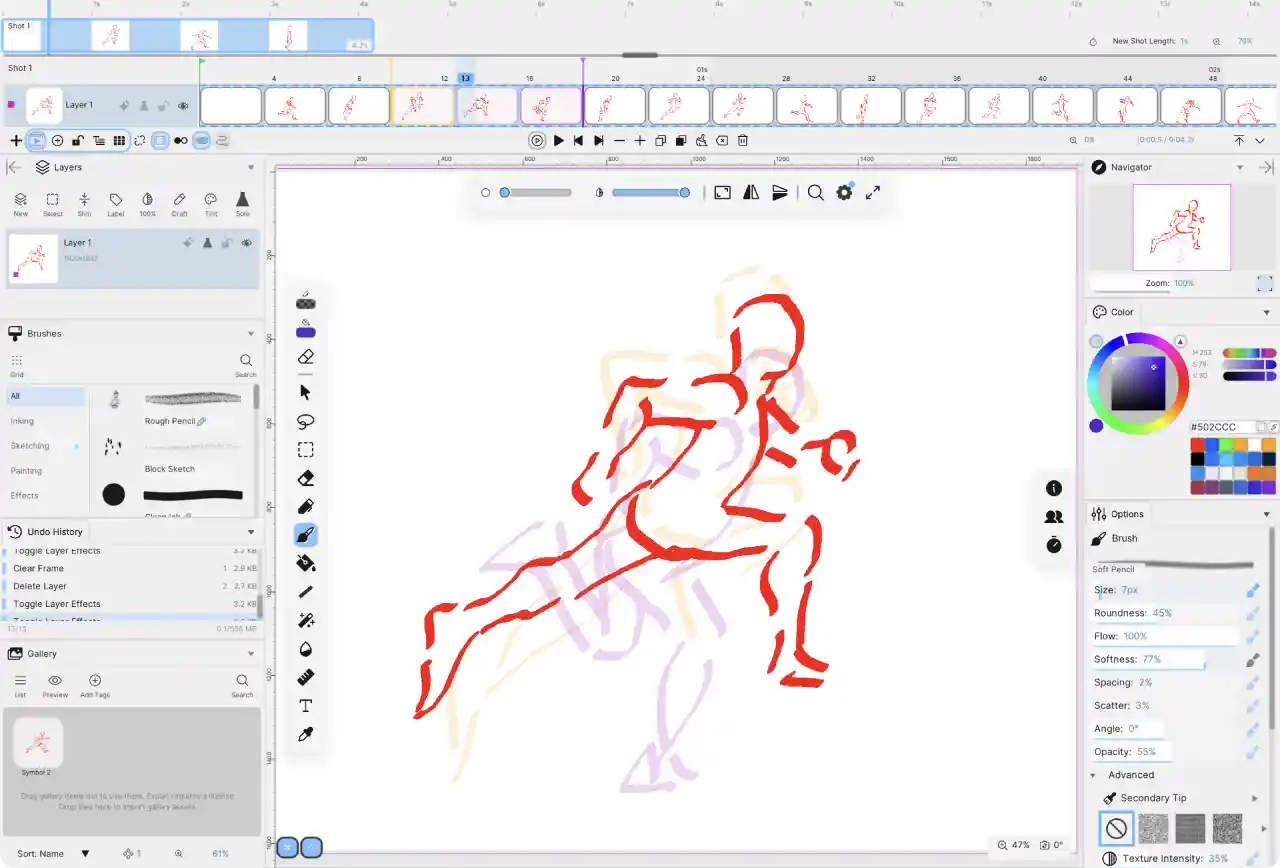
Every so often a new creative tool arrives with enough ambition to make animators pay attention. Umoupen is one of those tools. It has been earning early praise from professional animators, and once you look at what it promises, it is easy to see why. This is an animation and drawing app that blends raster and vector workflows, reusable assets, and live collaboration into a single package, and it arrives at a price that undercuts most of its rivals.
What Is Umoupen?
Umoupen is a dedicated animation and drawing application built for artists on Windows, macOS, and iPad, with Linux and Android support planned later. It positions itself as more than a sketching tool. The feature list reads more like a full production suite than a general-purpose drawing app, and that is the point. For anyone who grew up on Adobe Flash or Animate, the concept will feel familiar and welcome.
At its core, Umoupen lets you draw with both raster brushes and editable vector strokes, and you are not locked into one or the other when you start a project. You can mix vector and raster layers freely inside the same file, which gives you the flexibility of painterly texture and the precision of clean, adjustable lines whenever you need either one.
Drawing and Vector Tools
The drawing side of Umoupen covers the essentials and then some. You get brushes, pens, erasers, fills, selections, and transforms, along with support for styluses, pressure, tilt, and smoothing. Rulers, guides, and grids are on hand for layout work, and there is a dedicated mode for people who simply want to draw notes or comics rather than animate.
One of the standout ideas is the way vector editing works. Rather than fussing with handles, you grab a vector line and move it directly, much like the old Flash approach. An eraser set to split can cut lines cleanly at their intersections, which makes tidying up rough sketches quick and satisfying. You can also draw with textured brushes on a vector layer, a feature more commonly seen in tools like Clip Studio Paint, and you can import Photoshop and Clip Studio brushes so there is no need to rebuild your collection.
Reusable Assets and the Gallery
A feature that will resonate with longtime Flash users is Umoupen's gallery of reusable assets. You can save a drawing, animation, image, or piece of audio as a gallery item and drag it back into your timeline whenever you want. Reused animations become symbols that play in an isolated view, so editing the original updates every copy on the stage. It is a smart way to keep repeating elements consistent across a project.
Animation Features
For animation proper, Umoupen offers frame-by-frame drawing alongside tweening, so you can hand-draw your keys and in-betweens or let the app interpolate motion and properties for you. Onion skinning helps you judge timing, and multi-frame editing lets you adjust drawings across several frames at once.
Effects and Compositing
Effects live directly inside the application. You can add filters such as Gaussian blur, motion blur, and bloom, then animate their values over time using the tween editor. Because you can keyframe an effect's intensity, position, and even the curve of its motion, a good deal of compositing work can stay inside Umoupen rather than moving out to a separate tool. Effects remain non-destructive, so your original artwork stays editable.
Storyboarding, Timesheets, and 3D Reference
Beyond frame animation, Umoupen includes production features aimed at professionals. There is built-in storyboarding and shot sequencing, plus a drawable digital timesheet that can replace traditional exposure sheets and renumber frames for anime timing changes. You can also import OBJ and glTF 3D models to use as reference layers, which is handy for locking down proportions and perspective before you draw.
A Workspace You Can Shape
Umoupen leans hard into customization. Toolbars behave like app icons on a phone or tablet: hold one and drag it to any corner of the screen, or hide the tools you are not using to keep the interface clean. Panels such as layers can be docked to a side or popped up contextually as tabs. There are light and dark themes, adjustable interface and font scaling, and an option for either floating or flush, bordered toolbars depending on the look you prefer. An endless canvas lets you sketch freely at any size and crop your export to whatever area you like.
Live Online Sessions
One of the more forward-looking features is collaborative drawing. Umoupen lets you host or join a live session over the internet using a session code, so other artists can draw and animate alongside you in the same file. A connected-user list and chat keep everyone coordinated, and ownership controls stop collaborators from editing the same layers at once.
Pricing and Availability
Umoupen is refreshingly affordable. The desktop version costs $20 for permanent access, and there is a free trial for macOS and Windows. An iPad edition is arriving in July at $9.99, which places it squarely in the same range as established iPad animation apps like Toon Squid and Procreate Dreams. For a tool this feature-rich, that pricing is a genuine draw.
Final Thoughts
Umoupen is an exciting arrival for 2D animators. It brings together vector and raster drawing, reusable assets, tweening, effects, and live collaboration in one place, and it does so at a price that feels almost too good. As with any young application there are still rough edges to smooth out, but the ambition on display suggests a promising future. For anyone who has been waiting for a modern successor to the Flash workflow, Umoupen is well worth keeping an eye on.
Where to Learn More
If Umoupen sounds like the animation tool you have been waiting for, you can explore the full feature list, check the recommended system specs, and grab the free trial for macOS or Windows directly from the official website at https://umoupen.app/.It is the best place to see everything the app offers and to stay updated as the iPad version and future platform support roll out.